AI in Mobile App Development: Benefits, Trends & Future
Artificial intelligence is changing mobile app development, but the biggest impact is not simply that AI can write code. AI is becoming part of the entire mobile app lifecycle—from planning and coding to testing, personalization, security, analytics, and automation.
For developers, this means less time spent on repetitive tasks and more responsibility for architecture, product thinking, AI integration, security, and quality control.
For businesses, AI-powered mobile apps can create more personalized customer experiences, automate workflows, analyze user behavior, and introduce entirely new product capabilities.
Modern Android and Apple platforms are also making AI integration increasingly native. Android provides pathways for on-device, cloud, and hybrid AI, while Apple provides frameworks for on-device machine learning and generative AI experiences.
Quick Answer
AI in mobile app development uses technologies such as machine learning, generative AI, natural language processing, computer vision, and predictive analytics to improve how mobile apps are built and how they serve users. AI can accelerate coding, automate testing, personalize experiences, power chatbots and recommendations, detect fraud, and analyze data. However, experienced mobile developers are still needed to design architecture, validate AI output, protect user data, and ensure the app solves a real business problem.
What Is AI in Mobile App Development?
AI in mobile app development means using artificial intelligence during one or both of these stages:
- Building the mobile app
- Adding AI-powered capabilities inside the mobile app
These are related, but they are not the same thing.
For example, a developer might use an AI coding assistant to generate part of a Kotlin or Swift function. That is AI-assisted development.
On the other hand, a fitness application that analyzes user activity and recommends personalized workouts is an AI-powered mobile app.
AI-assisted development vs AI-powered apps
| Area | AI-Assisted Development | AI-Powered Mobile App |
| Main purpose | Helps developers build faster | Adds intelligent features for users |
| Example | AI-generated test cases | Personalized recommendations |
| Primary users | Developers and product teams | App users |
| Common technologies | AI coding assistants, testing tools | ML models, LLMs, NLP, computer vision |
| Business impact | Faster development workflow | New features and better user experiences |
A modern product can use both approaches at the same time.
For example, a team may use AI to accelerate development while building an application that uses machine learning and generative AI for its customers.
How AI Is Changing Mobile App Development
AI is influencing almost every major stage of the app development process.
1. AI Helps With Product Research and Planning
Before development starts, teams must understand:
- Who will use the app?
- What problem does it solve?
- Which features should be included in the MVP?
- Should the app be built for Android, iOS, or both?
- Which data will the AI system need?
- What privacy and security risks exist?
AI tools can help organize requirements, summarize research, generate user stories, and explore possible technical approaches.
However, AI cannot reliably replace product discovery.
A language model may generate a feature list, but it does not automatically know which features customers are willing to use or pay for.
Example
Imagine a company wants to build an AI-powered food delivery app.
An AI tool may suggest:
- Personalized restaurant recommendations
- Smart search
- Delivery-time predictions
- Customer support chatbot
- Dynamic promotions
Those ideas still need human evaluation.
The business must decide which feature creates enough value to justify its development and operating cost.
Pro Tip: Use AI to generate options, not to make important product decisions without validation.
2. AI-Assisted Coding Is Changing Developer Workflows
AI coding assistants can help mobile developers with:
- Boilerplate code
- UI components
- API integration examples
- Code explanations
- Refactoring suggestions
- Debugging
- Documentation
- Unit test generation
This can reduce the time spent staring at an empty editor or writing repetitive code.
Google's Android development ecosystem also supports AI-assisted development through tools such as Gemini in Android Studio.
But faster code generation does not guarantee better software.
Why human review still matters
Generated code can contain:
- Incorrect assumptions
- Security problems
- Performance issues
- Outdated APIs
- Poor architecture
- Incompatible dependencies
- Logic errors
A professional developer must still understand the code being added to the project.
AI can generate an answer. Developers remain responsible for whether that answer belongs in production.
AI Technologies Used in Mobile Apps
AI is not one single technology. Different mobile app features require different approaches.
Machine Learning
Machine learning enables applications to identify patterns and make predictions based on data.
Common examples include:
- Product recommendations
- Spam detection
- Demand forecasting
- Personalized content
- Fraud detection
- User behavior prediction
Apple's Core ML provides a framework for integrating machine learning models into apps and can support predictions using device hardware.
Generative AI
Generative AI can create or transform content.
In mobile applications, this may include:
- AI chat experiences
- Content generation
- Text summarization
- Image understanding
- Structured data extraction
- Smart search
- Virtual assistants
Android now provides pathways for generative AI using on-device models, cloud models, and hybrid approaches.
Apple's Foundation Models framework also supports intelligent tasks such as language understanding, structured output, and tool calling.
Natural Language Processing
Natural language processing, or NLP, helps applications understand and process human language.
Examples include:
- Customer support chatbots
- Voice assistants
- Text classification
- Language translation
- Sentiment analysis
- Intelligent search
Computer Vision
Computer vision allows an app to understand information from images or video.
Examples include:
- Face detection
- Object recognition
- Document scanning
- Barcode scanning
- Visual search
- Quality inspection
Predictive Analytics
Predictive analytics uses historical and current data to estimate possible future outcomes.
A mobile app could predict:
- Which customers may stop using a service
- Which products a user may purchase
- Potential fraud
- Expected demand
- Delivery delays
The Biggest Benefits of AI in Mobile App Development
AI can create value for both development teams and businesses.
Faster Development
AI can reduce time spent on repetitive activities such as:
- Creating basic code structures
- Writing test cases
- Reviewing documentation
- Debugging common issues
- Generating initial implementation ideas
This does not automatically mean that the entire app becomes cheaper.
A complex AI feature may introduce additional costs for:
- Model APIs
- Cloud infrastructure
- Data processing
- Monitoring
- Security
- AI evaluations
- Ongoing maintenance
The real business benefit comes from using AI where it meaningfully improves speed, quality, or customer value.
Better Personalization
Traditional apps often provide the same experience to every user.
AI-powered mobile apps can analyze relevant user signals and adapt experiences.
For example, an eCommerce app could recommend products based on:
- Previous purchases
- Browsing behavior
- Product preferences
- Seasonal trends
A learning application could adjust lessons based on user progress.
The goal is not personalization for its own sake. The goal is to help users find the right information or action more quickly.
Smarter Automation
AI agents and intelligent automation can help mobile apps perform multi-step tasks.
Examples include:
- Categorizing customer requests
- Extracting information from documents
- Routing support issues
- Summarizing activity
- Generating reports
- Assisting users with workflows
This is especially valuable for business applications where users repeatedly perform structured tasks.
Improved Data Analysis
Mobile applications generate large amounts of information.
AI can help teams identify:
- Unusual user behavior
- Potential fraud
- Common user problems
- Feature adoption patterns
- Performance anomalies
The important step is turning that analysis into an action.
Collecting more data without a clear purpose can create privacy, security, and compliance risks.
Real-World Use Cases of AI-Powered Mobile Apps
eCommerce
AI can support:
- Product recommendations
- Visual search
- Customer support
- Demand prediction
- Personalized promotions
Example
A customer frequently searches for running shoes.
The app can use relevant behavioral data to recommend:
- Similar shoes
- Compatible accessories
- Products within the user's preferred price range
However, recommendations should remain transparent and should not rely on inappropriate use of sensitive personal information.
Healthcare
Potential applications include:
- Symptom support tools
- Appointment assistance
- Document processing
- Medication reminders
- Medical image analysis
Healthcare AI requires additional care because incorrect output can create serious consequences.
AI-generated health information should not automatically be treated as professional medical advice.
Fintech
AI can support:
- Fraud detection
- Transaction categorization
- Customer support
- Spending analysis
- Risk monitoring
Fintech applications require strong security, privacy, accuracy, and regulatory controls.
Education
AI-powered learning apps can provide:
- Personalized learning paths
- Interactive tutoring
- Automated feedback
- Content summaries
- Language practice
Logistics and Delivery
AI can help with:
- Demand forecasting
- Route optimization
- Delivery predictions
- Driver assistance
- Operational automation
How AI Changes the Role of Mobile App Developers
AI is unlikely to eliminate the need for skilled mobile developers. Instead, the work is changing.
Developers will spend less time on purely mechanical tasks and more time on higher-level responsibilities.
Developers Need Stronger System Design Skills
Generating a function is different from designing a maintainable application.
A developer still needs to decide:
- How the app architecture should work
- How data moves through the system
- Which services should communicate
- Where AI models should run
- How failures should be handled
- How the system can scale
These decisions require understanding the specific product and its constraints.
AI Integration Becomes a Valuable Skill
Mobile developers increasingly need to understand:
- AI APIs
- Model capabilities
- Context management
- Structured outputs
- Tool calling
- On-device AI
- Cloud AI
- Hybrid AI architectures
For Android, developers can choose between different AI approaches depending on the task, data type, complexity, and deployment requirements.
Security and Privacy Become More Important
An AI-powered feature can introduce new risks.
For example:
A normal mobile app may send a user's form data to a backend.
An AI-powered app may additionally send prompts, context, documents, images, or conversation history to an AI service.
Teams must understand:
- What data is collected
- Where it is processed
- How long it is stored
- Who can access it
- Whether sensitive information is exposed unnecessarily
On-device AI can be useful when privacy, latency, offline capability, or cloud dependency is a major concern. Android and Apple both provide technologies for running certain AI workloads directly on supported devices.
On-Device AI vs Cloud AI vs Hybrid AI
One of the most important architectural decisions is where AI processing should happen.
| Factor | On-Device AI | Cloud AI | Hybrid AI |
| Internet required | Sometimes no | Usually yes | Depends on task |
| Privacy | Can be stronger | Depends on implementation | Varies |
| Latency | Often lower | Network dependent | Optimized by routing |
| Model capability | Device constrained | Can use larger models | Flexible |
| Operating cost | Lower cloud cost | Ongoing inference cost | Mixed |
| Offline support | Possible | Limited | Partial |
| Best for | Fast, private tasks | Complex AI workloads | Apps with varied requirements |
When should you choose on-device AI?
Consider it when:
- Low latency is important
- Offline functionality matters
- User data should remain on the device where possible
- The AI task can run within device constraints
When should you choose cloud AI?
Consider cloud-based AI when:
- You need larger or more capable models
- The task requires extensive knowledge or computation
- Centralized model updates are important
When is hybrid AI the best option?
A hybrid approach can route simple or sensitive tasks locally while sending more complex requests to a cloud model.
This approach can provide a balance between:
- Performance
- Privacy
- Cost
- Capability
AI in Android and iOS App Development
AI in Android App Development
Android developers can use AI through several approaches, including:
- Gemini models
- ML Kit
- On-device AI
- Cloud AI
- Hybrid AI workflows
- AI-assisted development tools
Android's AI development guidance specifically covers on-device, cloud, and hybrid approaches rather than treating AI as a single solution.
AI in iOS App Development
Apple provides technologies for machine learning and generative AI, including:
- Core ML
- Create ML
- Foundation Models framework
- Vision-related capabilities
- On-device processing options
Apple's current developer platform also emphasizes both on-device intelligence and the ability to work with different language model providers through its AI frameworks.
AI App Development Workflow: A Practical Process
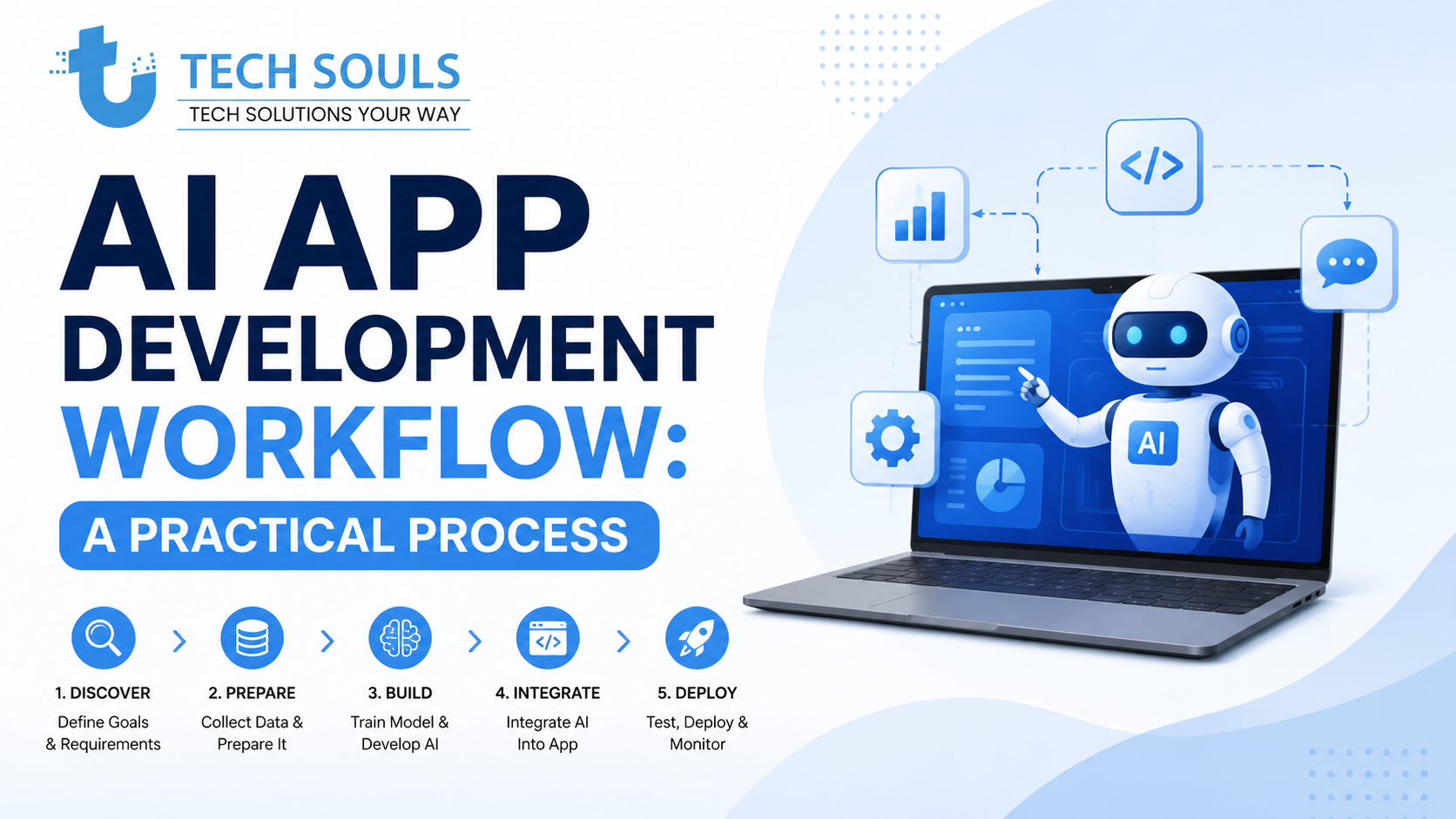
A successful AI feature should not begin with the question:
"How can we add AI to this app?"
A better question is:
"Which user or business problem can AI solve better than traditional software?"
Step 1: Define the Problem
Be specific.
Bad objective:
We need an AI chatbot.
Better objective:
Customers spend too much time finding the correct product information.
The second objective can be measured and tested.
Step 2: Decide Whether AI Is Actually Necessary
Not every feature requires AI.
A normal database query may be:
- Faster
- Cheaper
- More predictable
- Easier to maintain
Use AI when the problem involves areas such as:
- Natural language
- Predictions
- Pattern recognition
- Personalization
- Unstructured data
- Intelligent automation
Step 3: Choose the AI Approach
Select the appropriate technology:
- Machine learning model
- Large language model
- Computer vision
- Recommendation system
- Predictive model
Then decide whether it should run:
- On-device
- In the cloud
- Through a hybrid architecture
Step 4: Build a Small Prototype
Before investing heavily, test whether the AI can perform the required task.
Measure:
- Accuracy
- Response time
- Cost
- User experience
- Failure cases
Step 5: Add Guardrails
Generative AI can produce incorrect or unexpected results.
Depending on the use case, guardrails may include:
- Input validation
- Output validation
- Structured responses
- Content filtering
- Permission controls
- Human review
- Rate limiting
Step 6: Test Realistic Edge Cases
Do not test only perfect inputs.
Test:
- Misspelled requests
- Incomplete data
- Unexpected inputs
- Network failures
- Very long inputs
- Malicious prompts
- Model failures
Step 7: Monitor After Launch
AI features should continue to be evaluated after deployment.
Monitor:
- Accuracy
- User satisfaction
- Latency
- Error rates
- Cost
- Security events
Common Mistakes When Building AI-Powered Mobile Apps
Adding AI Without a Clear Use Case
AI should solve a real problem.
Adding a chatbot simply because competitors have one rarely creates a strong product advantage.
Trusting AI-Generated Code Without Review
AI-generated code should be treated as a starting point.
Developers must review:
- Security
- Correctness
- Architecture
- Performance
- Dependencies
Ignoring AI Operating Costs
An AI feature may have recurring costs.
Estimate usage before launch.
Consider:
- Requests per user
- Average input size
- Average output size
- Number of active users
- Cloud infrastructure
- Monitoring
Sending Too Much User Data to AI Services
Only collect and process data that is genuinely necessary for the feature.
Privacy should be considered during architecture design—not added as an afterthought.
Failing to Design for AI Errors
Traditional software often produces deterministic results.
Generative AI may produce:
- Incorrect answers
- Unexpected wording
- Incomplete results
The interface should account for uncertainty.
Warning: Never assume an AI response is correct simply because it sounds confident.
How Businesses Can Evaluate an AI Mobile App Development Company
If you are looking for AI mobile app development services, avoid choosing a company only because it mentions popular AI tools.
Ask practical questions.
1. Do They Understand the Business Problem?
A good development partner should first ask:
- Who are the users?
- What problem are we solving?
- How will success be measured?
2. Can They Explain the AI Architecture?
They should clearly explain:
- Which model or technology will be used
- Why it is appropriate
- Where the AI processing happens
- How data is protected
- How the system can scale
3. Do They Have Mobile Development Expertise?
AI is only one part of the product.
The team should also understand:
- Android
- iOS
- Cross-platform development
- APIs
- UI/UX
- Testing
- App performance
- Deployment
4. How Will They Control Cost?
Ask how the team will manage:
- API usage
- Model requests
- Infrastructure
- Scaling
- Monitoring
5. What Happens When AI Gives a Wrong Answer?
This question reveals a lot.
A reliable team should have a plan for:
- Validation
- Fallback behavior
- Error handling
- Monitoring
- Human escalation where necessary
AI in Mobile App Development: Pros and Cons
The right decision depends on whether the value created by AI outweighs the additional complexity.
| Advantages | Challenges |
| Faster development workflows | AI output can be incorrect |
| Better personalization | Privacy concerns |
| Intelligent automation | Ongoing operating costs |
| Improved predictions | More complex architecture |
| Enhanced customer support | Security risks |
| New product capabilities | Requires AI evaluation and monitoring |
Will AI Replace Mobile App Developers?
The most realistic answer is no—but mobile development roles are evolving.
AI can increasingly automate tasks that are:
- Repetitive
- Pattern-based
- Easy to describe
- Based on common examples
However, successful mobile products require more than generating code.
Developers and engineering teams still need to:
- Understand users
- Design architecture
- Make technical tradeoffs
- Review AI output
- Protect data
- Solve edge cases
- Maintain production systems
- Take responsibility when something fails
The developers who adapt to AI tools are likely to become more productive.
The key skill is not simply writing code faster.
It is knowing:
what should be built, how it should work, when AI should be used, and how to verify the result.
The Future of AI-Powered Mobile Apps
The next phase of mobile development is likely to involve more:
- On-device AI
- Hybrid AI architectures
- AI agents
- Voice interfaces
- Multimodal applications
- Personalized experiences
- AI-assisted automation
Recent Android and Apple platform developments show a broader move toward integrating AI directly into operating systems and development workflows, including on-device and agent-oriented capabilities.
This does not mean every mobile app should become an AI app.
The best products will use AI selectively.
A simple feature that solves a real problem is more valuable than an impressive AI feature that users do not need.
Frequently Asked Questions
What is AI in mobile app development?
AI in mobile app development involves using technologies such as machine learning, generative AI, NLP, computer vision, and predictive analytics to improve the development process or add intelligent features to Android and iOS applications.
What are the benefits of AI in mobile app development?
AI can help developers automate repetitive work, accelerate testing, analyze data, personalize user experiences, provide intelligent recommendations, automate workflows, and create new application capabilities.
Can AI build a complete mobile app?
AI can help generate code, interfaces, tests, and project structures. However, a production-ready application still requires human oversight for architecture, security, integration, testing, business requirements, and long-term maintenance.
How does AI improve mobile app user experience?
AI can personalize content, recommend relevant products or actions, improve search, support conversational interfaces, analyze user behavior, and automate repetitive tasks.
Is on-device AI better than cloud AI?
Neither is universally better. On-device AI can improve privacy, latency, and offline functionality, while cloud AI can provide access to more powerful models. A hybrid approach may be appropriate when an app needs both.
How much does AI mobile app development cost?
The cost depends on app complexity, AI model usage, integrations, platform requirements, data infrastructure, security, testing, and ongoing inference or cloud costs. AI can reduce effort in some areas while adding operational costs in others.
What should businesses look for in an AI mobile app development company?
Look for a team that understands mobile development, AI integration, security, UX, scalability, cost management, testing, and post-launch monitoring—not just access to an AI API.
Key Takeaways
- AI is changing both how mobile apps are built and what mobile apps can do.
- AI-assisted coding can increase developer productivity, but generated code still requires human review.
- Machine learning, generative AI, NLP, computer vision, and predictive analytics serve different purposes.
- Businesses should use AI to solve specific problems instead of adding it as a trend-driven feature.
- On-device, cloud, and hybrid AI each have different advantages.
- Security, privacy, cost, and AI reliability should be considered before development begins.
- AI is more likely to change the role of mobile developers than completely replace them.
- The strongest AI-powered mobile apps combine intelligent technology with strong product strategy and human engineering expertise.
Conclusion
AI in mobile app development is no longer limited to experimental chatbots or simple automation.
It is becoming part of the full mobile product lifecycle.
Developers can use AI to speed up coding, testing, debugging, and research. Businesses can use it to create personalized experiences, intelligent automation, predictive capabilities, and smarter user interactions.
However, the most successful approach is not to replace every process with AI.
It is to identify where AI provides a measurable advantage.
A strong mobile application still needs thoughtful product planning, reliable architecture, secure data handling, effective UX, testing, and long-term maintenance.
AI can accelerate development and make apps smarter—but experienced people are still responsible for building products that users can trust.
Need an AI-Powered Mobile App?
If your business has a mobile app idea, start by defining the problem, target users, and the specific role AI should play. Then evaluate the right mobile platform, AI architecture, privacy requirements, and long-term operating costs before moving into full development.
Continue Exploring TechSouls
Technology is constantly evolving, and staying informed helps you make better decisions whether you're interested in software, AI, cybersecurity, gadgets, or the latest tech trends. At TechSouls, we regularly publish in-depth guides, tutorials, troubleshooting articles, and breaking technology news to keep you updated with accurate and practical information. If you found this article helpful, explore more of our latest content below to expand your knowledge and stay ahead in the fast-changing world of technology.
[Cybersecurity Updates 2026: Latest Threats & Protection Tips]
[Droven io AI News: Top Trends & Breakthroughs 2026]
[Gesture Recognition Technology: Types, Uses & How It Works]
[DevOps Consulting Services: Benefits, Cost & Process]
[Evolution of Digital Technology: Trends, AI and Innovation (2026)]
[Information About Foxtpax Software: Complete Guide (2026)]
[Endbugflow Software: Features, Benefits & How It Works]
[Aggr8Tech Digital Technology: Features, Benefits & Uses (2026)]
[Software Development Process: SDLC Guide & Best Practices]
[Goseboze AI Tools: Best AI Products to Find & Compare in 2026]